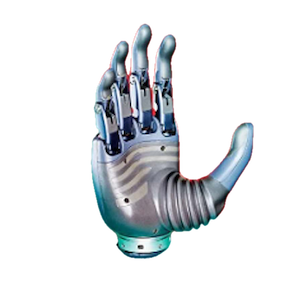
Revo 3 Communication Protocol
This page is for developers who access Revo 3 registers directly over RS485 or CAN FD. Revo3 SDK applications should use the physical units defined by the API. The SDK already handles register scaling, byte order, CRC, and CAN FD frame encapsulation; do not apply those conversions again.
The motion registers documented here use Revo3 Ultra (21 DOF) as the baseline. Before integrating another Revo 3 model, read and verify the joint count and order reported by JointLayout. Do not send a 21-joint control frame to an unvalidated layout.
Before writing registers
Confirm the device ID, model, firmware version, and joint layout. Before writing configuration or motion registers, keep people and obstacles outside the hand workspace and provide a way to remove actuator power independently of software control.
1. Supported interfaces
| Interface | Transport |
|---|---|
| RS485 | Modbus RTU |
| CAN FD | Complete Modbus RTU frames encapsulated in CAN FD extended frames |
2. Modbus RTU
Revo 3 RS485 communication uses the standard Modbus RTU frame format.
2.1 Frame Format
| Header / Device ID | Function Code | Data | CRC16 |
|---|---|---|---|
| 1 Byte | 1 Byte | N Bytes | 2 Bytes |
2.2 Field Descriptions
| Field | Description |
|---|---|
| Header/Device ID | Slave device address |
| Function Code | Modbus function code (e.g., 03H: Read Holding Registers; 04H: Read Input Registers; 06H: Write Single Holding Register; 10H: Write Multiple Holding Registers) |
| Data | Data payload, varying based on the function code and register address |
| CRC16 | CRC-16 (Modbus) checksum, low byte first, high byte last |
The commonly supported function codes are 0x03 (Read Holding Registers), 0x04 (Read Input Registers), 0x06 (Write Single Holding Register), and 0x10 (Write Multiple Holding Registers). Write a multi-register command in one complete 0x10 request; do not split it into single-register requests that the device could execute separately.
3. CAN FD Encapsulation Format
When using the CAN FD interface, the underlying communication still contains Modbus protocol data, which is encapsulated and transmitted within a 29-bit CAN FD extended frame.
The CAN FD arbitration rate is fixed at 1 Mbps. The data phase supports 1, 2, 4, and 5 Mbps, with 5 Mbps as the default.
3.1 CAN FD ID Format
The 29-bit CAN FD ID is allocated as follows:
| Bits | Field | Description |
|---|---|---|
| 28 ~ 24 | Reserved | Fixed to 0 |
| 23 ~ 16 | Device ID | Slave device address |
| 15 ~ 8 | Master ID | Host device ID (defined by host) |
| 7 ~ 0 | Payload Length | Actual length of active data payload (Bytes) |
Default Device ID
| Device | Default Device ID (Decimal) | Default Device ID (Hexadecimal) |
|---|---|---|
| Left Hand | 126 | 0x7E |
| Right Hand | 127 | 0x7F |
3.2 Frame Formats
Host Transmission Frame
| CAN FD ID (29-bit) | Data Segment (Payload, ≤ 64 Bytes) |
|---|---|
| Device ID + Master ID + Payload Length | Complete Modbus RTU request frame (including checksums) |
Device Reply Frame
| CAN FD ID (29-bit) | Data Segment (Payload, ≤ 64 Bytes) |
|---|---|
| Device ID + Master ID + Payload Length | Complete Modbus RTU response frame |
Payload Length is the actual size of the complete Modbus RTU frame in the CAN FD data field, including Device ID, function code, data, and CRC16. The maximum is 64 Bytes.
When a supported broadcast request is used, a response carries the hand's own Device ID rather than the broadcast ID. Broadcast applies only to RS485 integrations that explicitly support it. CAN FD uses the distinct 0x7E / 0x7F hand IDs and does not support Device ID 0 broadcast.
4. Register Map Overview
Revo 3 registers are grouped by function as follows:
| Address Range | Register Type | Category |
|---|---|---|
| 0 ~ 199 | Holding Register | System Configuration |
| 200 ~ 399 | Holding Register | Motor Parameters |
| 500 ~ 573 | Holding Register | Firmware Update (SDK-managed; packet details are not public) |
| 1000 ~ 1599 | Holding Register | Control Commands |
| 1800 ~ 1999 | Input Register | System Status |
| 2030 ~ 2999 | Input Register | Motor Feedback |
| 3000 ~ 3999 | Input Register | Device Information |
| 4000 ~ 4751 | Holding / Input Register | Piezoresistive array touch modules |
| 5003 ~ 5910 | Holding / Input Register | High-density tactile array modules |
| 6500 ~ 6709 | Holding / Input Register | Fingertip force/torque touch modules |
5. System Configuration Registers
System configuration registers (address range 0~199) support read/write access.
| Address | Name | Access | Description |
|---|---|---|---|
| 60 ~ 80 | Motor Zero Offset | RW | Unit: 0.01° (transmitted as value × 100). Total 21 joints. |
| 81 | Set Current Position as Zero | WO | Write 1; verify that the mechanical position is safe first. |
| 101 | Hand Identity | RO | 1 = Right hand, 2 = Left hand |
| 102 | Restore Finger Defaults | WO | Write specific value to restore default finger parameters. |
| 105 | Buzzer Switch | RW | 0 = Off, 1 = On |
| 106 | Vibration Motor Switch | RW | 0 = Off, 1 = On |
| 107 | Touch Screen Switch | RW | 0 = Off, 1 = On |
| 108 | Device ID | RW | Default: 126 for Left hand, 127 for Right hand |
| 109 | RS485 Baudrate | RW | See 5.1 RS485 Baudrate |
| 110 | CAN FD Baudrate | RW | See 5.2 CAN FD Baudrate |
| 111 | Software Reboot | WO | Write 1 to reboot the device. |
| 112 | Auto Calibration | RW | 0 = Off, 1 = On (automatically run calibration on boot) |
| 113 | Joint Position Calibration | WO | Write 1; do not send motion commands while calibration is active. |
| 114 | Calibration Current | WO | Write the calibration-current value; prefer the SDK Calibration API. |
| 117 | Clear Motor Faults | WO | Write 1; remove the fault cause before clearing. |
| 118 | Teaching Mode | RW | Write 1 to enter, 0 to exit |
| 119 | Software Stop | RW | Write 1 to stop and 0 to recover. This is not a functional-safety emergency stop. |
| 120 | Use Broadcast ID | RW | 1 = Enabled (default), 0 = Disabled. See the CAN FD broadcast limitation. |
| 131 | Auto-clear Motor Error | RW | 0 = Off (default), 1 = On |
5.1 RS485 Baudrate
| Value | Baudrate |
|---|---|
| 0 | 1 Mbps |
| 1 | 2 Mbps |
| 2 | 3 Mbps |
| 4 | 5 Mbps (default) |
5.2 CAN FD Baudrate
| Value | Baudrate |
|---|---|
| 0 | 1 Mbps |
| 1 | 2 Mbps |
| 2 | 4 Mbps |
| 3 | 5 Mbps |
6. Motor Parameters
The units for motor parameters are defined as follows:
- Position: Degrees (°)
- Velocity: Revolutions per minute (rpm)
- Current: Milliamperes (mA)
💡 Numerical Scaling Details
To maintain data precision, position and velocity values are transmitted as integers using actual value × 100.
- Angle Example: Target position
90.00°→ transmitted register value is9000. - Velocity Example: Target velocity
50.00 rpm→ transmitted register value is5000. - Current Example: Target protection currents directly use the physical value in mA.
6.1 Global Protection Current
| Address | Parameter | Access | Description |
|---|---|---|---|
| 200 | All Joints Protection Current (mA) | WO | Configures protection current for all 21 joints at once |
6.2 Single Joint Protection Current
| Address | Parameter | Access | Description |
|---|---|---|---|
| 201 ~ 221 | Joint Protection Current (mA) | RW | Maximum allowed current for joints 0 to 20 |
6.3 Joint Movement Limits
| Address | Parameter | Access | Description |
|---|---|---|---|
| 240 ~ 260 | Min Position Limit (° × 100) | RW | Physical minimum position limit for joints 0 to 20 |
| 270 ~ 290 | Max Position Limit (° × 100) | RW | Physical maximum position limit for joints 0 to 20 |
| 300 ~ 320 | Min Velocity Limit (rpm × 100) | RW | Minimum speed limit for joints 0 to 20 |
| 321 ~ 341 | Max Velocity Limit (rpm × 100) | RW | Maximum speed limit for joints 0 to 20 |
7. Control Commands
Revo 3 supports position, velocity, current, impedance, damping, and MIT control. A command can move a joint immediately. During initial commissioning, limit current and velocity and keep people and obstacles outside the workspace.
7.1 General Control Modes
| Value | Mode | Control Parameter |
|---|---|---|
| 0 | Position | Target angle (° × 100) |
| 1 | Velocity | Target velocity (rpm × 100) |
| 2 | Current | Target current (mA) |
| 4 | Impedance | Impedance coefficient (value × 100) |
| 5 | Damping | Damping coefficient (value × 100) |
7.2 General Control Registers
| Address | Parameter | Description |
|---|---|---|
| 1000 | Joint ID | 0~20 on Revo3 Ultra |
| 1001 | Control Mode | Uses the value from 7.1 |
| 1002 | Control Parameter | Encoding depends on the selected mode |
| 1010 | Multi-joint Control Mode | Uses the value from 7.1 |
| 1011 ~ 1031 | 21 Joint Parameters | Ordered by joint ID; use only according to the active JointLayout |
| 1500 | Four-finger Index | 1 = Index, 2 = Middle, 3 = Ring, 4 = Pinky |
| 1501 | Four-finger Control Mode | Uses the value from 7.1 |
| 1502 ~ 1505 | Four-finger Parameters | [Abduction MCP, MCP, PIP, DIP] |
| 1510 | Thumb Control Mode | Uses the value from 7.1 |
| 1511 ~ 1515 | Thumb Parameters | Logical order [Rotation, MCP, IP, Abduction, Flexion], corresponding to J16~J20 |
7.3 MIT Control Formula
Data Scaling
, , Position, Velocity are transmitted as actual value × 100. - Current (
) is transmitted directly in mA.
Example:
target = 5.00 transmitted value = 500 target = 0.50 transmitted value = 50 - Position target = 90.00°
transmitted value = 9000 - Velocity target = 50.00 rpm
transmitted value = 5000 - Current (
) target = 1000 mA transmitted value = 1000
7.4 Single Joint MIT Control
Enables standalone control of a specific joint:
| Address | Parameter | Description |
|---|---|---|
| 1050 | Joint ID | Target joint number (0 ~ 20) |
| 1051 | Proportional stiffness gain (value × 100) | |
| 1052 | Derivative damping gain (value × 100) | |
| 1053 | Position | Target position (° × 100) |
| 1054 | Velocity | Target velocity (rpm × 100) |
| 1055 | Current ( | Feedforward current (mA) |
7.5 Multi-Joint MIT Control
Provides a continuous register map block for bulk updates of multiple joints:
| Address Range | Target Joint | Parameter Array | Description |
|---|---|---|---|
| 1100 ~ 1104 | Joint 0 | 5 consecutive registers | |
| 1105 ~ 1109 | Joint 1 | 5 consecutive registers | |
| ... | ... | ... | ... |
| 1195 ~ 1199 | Joint 19 | 5 consecutive registers | |
| 1200 ~ 1204 | Joint 20 | 5 consecutive registers |
7.6 Bulk Parameter Controls
Enables targeted bulk updates for a single MIT parameter across all joints:
| Address Range | Parameter | Description |
|---|---|---|
| 1300 ~ 1320 | Proportional gain ( | |
| 1321 ~ 1341 | Damping gain ( | |
| 1342 ~ 1362 | Position List | Target position ( |
| 1363 ~ 1383 | Velocity List | Target velocity ( |
| 1384 ~ 1404 | Feedforward current ( |
7.7 Four-Finger MIT Control
Used to control the index, middle, ring, or pinky finger:
| Address | Parameter | Description |
|---|---|---|
| 1520 | Finger Index | 1 = Index, 2 = Middle, 3 = Ring, 4 = Pinky |
| 1521 ~ 1540 | Parameter Array | Total 20 registers containing gains and references: 1. Abduction/Adduction MCP 2. Flexion/Extension MCP 3. PIP 4. DIP |
7.8 Thumb MIT Control
Used to control the 5-DOF thumb structure:
| Address Range | Parameter Array | Description |
|---|---|---|
| 1550 ~ 1574 | 5-DOF Parameters | 25 registers ordered by logical joints J16~J20: 1. Rotation 2. MCP 3. IP 4. Abduction 5. Flexion |
8. System Status
System status registers (address range 1800~1999) are read-only input registers.
| Address | Parameter | Unit | Description |
|---|---|---|---|
| 1800 | System Status Code | — | See 8.1 System Status Code Definitions |
| 1801 | Total Current | mA | Current consumption of the hand |
| 1802 | Total Voltage | V | Supply voltage of the hand |
| 1803 | Total Power | W | Power consumption of the hand |
| 1804 | System Temperature | ℃ | Temperature of the main control board |
The device samples these system parameters internally at 5 Hz. Poll at no more than 5 Hz to avoid consuming bus bandwidth without obtaining newer data.
8.1 System Status Code Definitions
The status code register (1800) uses high and low bytes to indicate errors:
- High 8 Bits (High Byte): Core fault flag
0= Normal1= Fault
- Low 8 Bits (Low Byte): Detailed exception categories
0= Normal1= Communication failure2= Uncalibrated3= Temperature abnormal
9. Motor Feedback
Read input registers 2030~2999 to monitor motor state. The table below describes the 21-joint Revo3 Ultra layout. For other models, read only the joints declared by the active JointLayout.
| Address Range | Parameter | Unit | Description |
|---|---|---|---|
| 2030 ~ 2050 | Motor Velocity | rpm × 100 | Current rotational speed of motors 0 ~ 20 |
| 2060 ~ 2080 | Motor Position | ° × 100 | Current angular position of motors 0 ~ 20 |
| 2090 ~ 2110 | Motor Current | mA | Current drive current of motors 0 ~ 20 |
| 2120 ~ 2140 | Motor Fault Code | Bit field | See 9.1 Motor Fault Code Definitions |
| 2150 ~ 2170 | Motor Temperature | ℃ | Temperature of motors 0 ~ 20 (internal or driver IC) |
9.1 Motor Fault Code Definitions
The motor fault registers (2120~2140) use bitwise flags. Do not use reserved bits in application logic; preserve the raw value in logs and diagnostics.
| Bit | Description |
|---|---|
| 0 | Over-current |
| 1 | Over-voltage |
| 2 | Under-voltage |
| 3 | Over-temperature |
| 4 | Current Spike |
| 5 ~ 7 | Reserved |
| 8 | Motor Stall |
| 9 ~ 10 | Reserved |
| 11 | Motor Running |
| 12 ~ 15 | Reserved |
10. Device Information
Device information registers (address range 3000~3999) are read-only.
| Address Range | Parameter Name | Format / Details |
|---|---|---|
| 3020 ~ 3021 | Motor Online Mask | RO, 32-bit bitmask; bits 0~20 map to motors 0~20 |
| 3030 ~ 3039 | Firmware Version | RO, Big-Endian ASCII string |
| 3040 ~ 3049 | Hardware Version | RO, Big-Endian ASCII string |
| 3050 ~ 3059 | Product SN | RO, Big-Endian ASCII string |
| 3060 ~ 3269 | Motor SN | RO, Big-Endian ASCII string, 10 registers per motor SN (21 motors total) |
| 3300 ~ 3320 | Motor Firmware Version | RO, binary version representation |
10.1 Encoding Details
Versions & Serial Numbers (ASCII)
Strings are stored in Big-Endian byte order inside the registers. Each uint16_t register holds 2 characters:
- High Byte: Holds the first character
- Low Byte: Holds the second character
Each field uses 10 registers, supporting a maximum string length of 20 characters (including trailing null \0).
Decoding Example:
| Register Array (Big-Endian uint16_t) | Hexadecimal Bytes | Decoded ASCII String |
|---|---|---|
0x534E, 0x3132, 0x3334, 0x3536, 0x3738, 0x3930, 0x3132, 0x3334, 0x3500 | 53 4E 31 32 33 34 35 36 37 38 39 30 31 32 33 34 35 00 | "SN123456789012345" |
Motor Firmware Version
The motor firmware version is stored in a single uint16_t split into:
- High Byte: Major version
- Low Byte: Minor version
Parsing Format: Version = V[Major].[Minor]
- E.g., read value
0x0105represents versionV1.5.
11. Touch Protocols
Touch modules integrated into the hand's primary communication link use the technical codes below. A device supports only the capabilities declared by its installed layout. Applications must not infer touch type or point count from the product name alone.
| Technical Code | Functional Type | Register Area |
|---|---|---|
| Piezoresistive array | Piezoresistive array touch module | 4000 series |
| High-density tactile array | High-density tactile array module | 5000 series |
| Fingertip force/torque | Fingertip force/torque touch module | 6500 series |
Ultra VisionTouch's independent fingertip channels do not travel over the Modbus/CAN FD primary link and are not part of the register protocols below. Primary-link piezoresistive or high-density finger-pad and palm arrays on the same hand use the register protocols below after discovery confirms them.
11.1 Common Module IDs
The piezoresistive and high-density tactile arrays share the following 11 physical module IDs:
| Module ID | Location |
|---|---|
| 0 | Palm |
| 1 | Thumb tip |
| 2 | Thumb pad |
| 3 | Index tip |
| 4 | Index pad |
| 5 | Middle tip |
| 6 | Middle pad |
| 7 | Ring tip |
| 8 | Ring pad |
| 9 | Pinky tip |
| 10 | Pinky pad |
A combined layout may use sparse module IDs. SDK applications must match data by TouchLayout.modules[*].module_id; do not assume that an array index always equals the module ID.
11.2 Piezoresistive Array Touch
Control Registers
| Address | Access | Function |
|---|---|---|
| 4000 ~ 4010 | RW | Module enable: 0 = Disabled, 1 = Enabled |
| 4011 | WO | Zero-calibrate all modules; write any nonzero value |
| 4012 ~ 4022 | WO | Zero-calibrate one module; write 1 |
| 4023 | RW | Read mode: 0 = Point array, 1 = Compatibility regional-force summary |
| 4024 | RW | Point value mode: 0 = ADC, 1 = Reserved, 2 = Force |
| 4025 | WO | All regional forces: 2 = Tare, 3 = Restore factory baseline |
| 4026 ~ 4036 | WO | One module's regional forces: 2 = Tare, 3 = Restore factory baseline |
Mode 4023 = 1 is retained for compatibility with a limited number of delivered devices. New applications should use point-array mode and the SDK Touch API. Register 4024 value 1 is unused and must not be written.
Regional-force Input Registers
Each value is the sum of the calibrated pressure points in that region. The thumb pad currently exposes five values; register 4109 is reserved.
| Address | Content |
|---|---|
| 4100 | Palm resultant force |
| 4101 ~ 4103 | Thumb-tip forces 1~3 |
| 4104 ~ 4108 | Thumb-pad forces 1~5 |
| 4109 | Reserved |
| 4110 ~ 4112 | Index-tip forces 1~3 |
| 4113 ~ 4117 | Index-pad forces 1~5 |
| 4118 ~ 4120 | Middle-tip forces 1~3 |
| 4121 ~ 4125 | Middle-pad forces 1~5 |
| 4126 ~ 4128 | Ring-tip forces 1~3 |
| 4129 ~ 4133 | Ring-pad forces 1~5 |
| 4134 ~ 4136 | Pinky-tip forces 1~3 |
| 4137 ~ 4141 | Pinky-pad forces 1~5 |
Point-array Input Registers
| Module | Address Range | Points |
|---|---|---|
| Palm | 4200 ~ 4235 | 36 |
| Thumb tip | 4250 ~ 4280 | 31 |
| Thumb pad | 4290 ~ 4346 | 57 |
| Index tip | 4350 ~ 4370 | 21 |
| Index pad | 4400 ~ 4451 | 52 |
| Middle tip | 4460 ~ 4480 | 21 |
| Middle pad | 4500 ~ 4551 | 52 |
| Ring tip | 4560 ~ 4580 | 21 |
| Ring pad | 4600 ~ 4651 | 52 |
| Pinky tip | 4660 ~ 4680 | 21 |
| Pinky pad | 4700 ~ 4751 | 52 |
11.3 High-density Tactile Array
| Address | Type / Access | Function |
|---|---|---|
| 5003 ~ 5178 | Input / RO | Serial numbers for 11 modules; 16 registers and 32 Bytes per module, high byte first |
| 5179 | Holding / WO | Restart all modules; write 1 |
| 5180 ~ 5190 | Holding / WO | Restart one module; write 1 |
| 5191 ~ 5201 | Input / RO | Actual point count for each module |
| 5202 | Holding / RW | Output mode for all modules: 0 = ADC, 1 = Force |
| 5203 ~ 5213 | Holding / RW | Output mode for one module |
| 5214 | Holding / WO | Tare command for all modules: 1 = Tare, 2 = Cancel/restore default baseline |
| 5215 ~ 5225 | Holding / WO | Tare command for one module |
| 5226 | Holding / RO | Global tare status: 0 = Not tared, 1 = Tared, 2 = Busy or failed |
| 5227 ~ 5237 | Holding / RO | Tare status for one module |
| 5240 ~ 5839 | Input / RO | Point-array data buffers |
| 5900 ~ 5910 | Holding / RW | Module enable: 0 = Disabled, 1 = Enabled |
Each point-data register contains two uint8 values, high byte first. ADC values range from 0~255. In force mode, each raw unit represents 10 mN. Read the active point counts from 5191~5201; never substitute buffer capacity for the active count.
| Module | Data Start | Buffer Capacity (points) |
|---|---|---|
| Palm | 5240 | 200 |
| Thumb tip | 5340 | 80 |
| Thumb pad | 5380 | 120 |
| Index tip | 5440 | 80 |
| Index pad | 5480 | 120 |
| Middle tip | 5540 | 80 |
| Middle pad | 5580 | 120 |
| Ring tip | 5640 | 80 |
| Ring pad | 5680 | 120 |
| Pinky tip | 5740 | 80 |
| Pinky pad | 5780 | 120 |
Current firmware reads serial numbers, point counts, and point-array data with function code 0x04. Some earlier firmware exposes a holding-register compatibility mapping. Use SDK auto-detection for legacy devices instead of hard-coding a guessed function code.
11.4 Fingertip Force/Torque Touch
This layout contains five fingertip modules ordered as Thumb, Index, Middle, Ring, and Pinky.
| Address | Access | Function |
|---|---|---|
| 6500 ~ 6504 | RW | Module enable: 0 = Disabled, 1 = Enabled |
| 6510 ~ 6514 | WO | Force/torque zeroing; write 1 |
| 6520 ~ 6709 | RO | Five module blocks, each containing 38 input registers |
The module blocks start at 6520, 6558, 6596, 6634, and 6672. Each block uses the following offsets:
| Block Offset | Data Type | Content |
|---|---|---|
| 0 | uint16 | Module state: 0 = Warming up, 1 = Ready, 2 = Offline |
| 1 | uint16 | Sensor state: 0 = Normal, nonzero = Fault |
| 2 ~ 11 | 5 × float32 | Fx, Fy, Fz, Mx, My, with the high 16-bit word first |
| 12 ~ 13 | float32 | Scalar resultant force Fn; it is not Fz |
| 14 ~ 37 | 48 × uint8 | Film points; odd-numbered point in the high byte, even-numbered point in the low byte |
The protocol expresses Fx, Fy, and Fz in N and Mx, My in N·m. The SDK exposes force in mN. Applications should use force, torque, and point-array values only when both module and sensor state are normal.
11.5 SDK Guidance
The SDK normalizes the different touch protocols into TouchLayout and TouchFrame. Read module ID, point count, region, and signal capabilities from the layout, and use each frame's TouchSampleState to determine whether its data is valid. Stop parsing an unknown layout; never apply another device's fixed point order or geometry mapping.
12. Joint ID Definitions
Revo3 Ultra has 21 active joints. The diagram below maps each joint ID to its physical location:
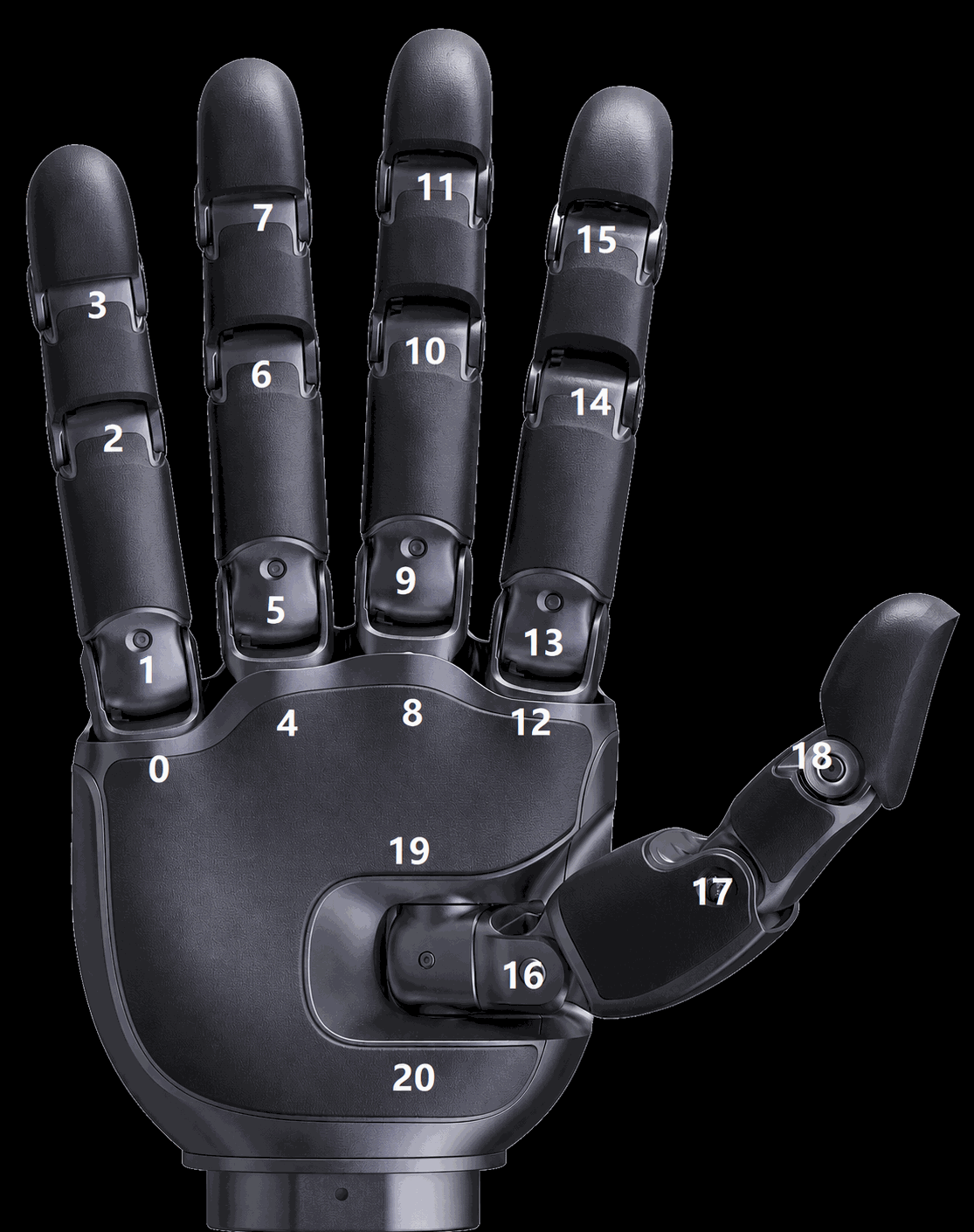 Revo3 Ultra joint ID layout for 21 active joints