Get SDK
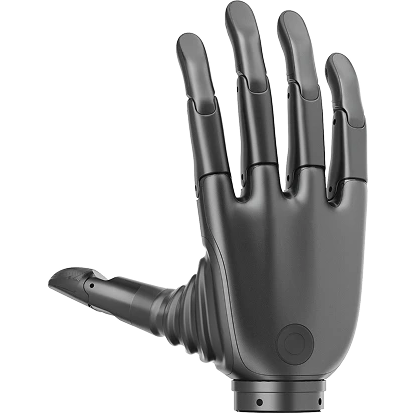
The Revo Hand SDK (Software Development Kit) is a cross-platform software development toolkit specially designed for BrainCo Revo 3 robotic hands, providing high-density 21-motor independent control APIs, automatic homing calibration, high-frequency polling, and rich debugging demos.
System Requirements
To ensure optimal real-time communication performance, the host machine should meet the following specifications:
- Python: 3.9 ~ 3.12 environment
- Linux: Ubuntu 20.04/22.04 LTS (x86_64 / aarch64 architecture supported) with glibc ≥ 2.31
- macOS: macOS 10.15+ version
- Windows: Windows 10/11 environment
- Hardware Interface: Industrial-grade RS485 module/bus card supporting ultra-high baud rates up to 5M
Download & Installation
1. GitHub Repository
Clone the SDK repository before running the examples:
git clone https://github.com/BrainCoTech/brainco-revo3-sdk.git
cd brainco-revo3-sdk2. Python Package Installation
It is strongly recommended to use a virtual environment (such as Conda or venv) and install the specialized Revo 3 package:
python3 -m venv .venv
source .venv/bin/activate
# Install the Revo 3 core SDK package
pip3 install bc-revo3-sdk==1.1.0⚠️ Permission Configuration & Latency Optimization for High-Baudrate Communication
On Linux hosts, accessing ports at a 5M baudrate usually demands specific system permissions:
- Port Permission Configuration: Add the current user to the
dialoutgroup to execute serial commands withoutsudo(requires shell restart to apply):bashsudo usermod -a -G dialout $USER - Enable FTDI Low-Latency Mode: To minimize the USB serial buffering latency, it is strongly recommended to flag the serial port with
low_latencyafter initialization:bashsudo setserial /dev/ttyUSB0 low_latency
Example Code & Run Guide
After cloning the SDK repository, you can find reference examples tailored for the Revo 3 Dexterous Hand under the python/ and c/ directories. The default communication baud rate is configured to 5M (5000000 bps). By default, the Slave ID is 126 for the left hand and 127 for the right hand.
1. Python Demos
Navigate into the python/ directory and install the requirements first:
cd python
pip install -r requirements.txt
# Run automatic port & Slave ID scan
python revo3/auto_detect.py
# Run basic motor control demo
python revo3/hand_demo.py
# Run motion trajectory planning
python revo3/hand_trajectory.py
# Run OTA firmware upgrade
python revo3/hand_dfu.py /path/to/firmware.bin
# Launch Qt GUI debug panel (supports mock mode)
python gui/main.py --mock💡 Expected Python Console Output
$ python revo3/hand_demo.py
[2026-05-27 10:10:02.124] [INFO] Stark SDK version 1.1.0 initialized.
[2026-05-27 10:10:02.125] [INFO] Scanning serial port: /dev/ttyUSB0 (Baudrate: 5000000 bps)
[2026-05-27 10:10:02.341] [INFO] Found Revo 3 Dexterous Hand [Right Hand, ID: 127]
[2026-05-27 10:10:02.342] [INFO] Performing initial joint origin calibration sweep...
[2026-05-27 10:10:04.512] [INFO] Calibration complete. All 21 motors successfully zeroed.
[2026-05-27 10:10:04.513] [INFO] Sending command: Move thumb flexion to 50.0°, index to 60.0°
[2026-05-27 10:10:05.102] [INFO] Feedback: Position[Thumb]=49.8°, Current[Thumb]=84mA | Status: MOTOR_RUNNING
[2026-05-27 10:10:05.612] [INFO] Feedback: Position[Thumb]=50.0°, Current[Thumb]=12mA | Status: MOTOR_IDLE
[2026-05-27 10:10:06.000] [INFO] Demo completed. Closing serial port.auto_detect.py: Scans serial ports to automatically discover online Revo 3 hands, validating ID and baud rate configurations.hand_demo.py: Demonstrates basic joint control, allowing position, velocity, and current limit setups with instant query.hand_trajectory.py: Controls fingers via coordinated multi-dof trajectory planning for elegant grasping operations.hand_dfu.py: OTA firmware utility to safely flash firmware binaries.gui/main.py: A cross-platform Qt GUI interface designed with visual telemetry, interactive sliders, and live plotting graphs.
2. C++ Demos
For high-frequency, low-latency industrial/research applications, you can compile and execute native binaries under c/:
# 1. Download core static/dynamic library assets
sh download-lib.sh
# 2. Build the C++ examples project
make -C c
# 3. Run target executables
# Scan device channels
./c/demo/auto_detect
# Run basic control flow
./c/demo/hand_demo
# Run trajectory demonstration
./c/demo/hand_trajectory
# Run local firmware OTA upgrade
./c/demo/hand_dfu firmware.bin💡 Expected C++ Console Output
$ ./c/demo/hand_demo
[STARK INFO] Serial port successfully opened on /dev/ttyUSB0 at 5000000 bps.
[STARK INFO] Connecting to device ID: 127...
[STARK INFO] Device acknowledged. Firmware version: v3.2.14
[STARK INFO] Launching motor sweep calibration...
[STARK SUCCESS] Joint calibration completed in 2.18s.
[STARK INFO] Write [Target: Position] | ID 127 -> Motor[0]=12000, Motor[1]=15000
[STARK INFO] Read [Feedback] | Motor[0]: Pos=12000, Vel=0, Cur=10 | Status=0x01
[STARK INFO] Execution successful. Terminating connection.auto_detect: C++ sweep utility designed to discover active serial channels and Modbus RTU addresses.hand_demo: C ABI based motor command dispatcher and sensory query loops.hand_trajectory: Dynamic multi-joint path planning and smooth profile generation in C++.hand_dfu: Secure chunk-by-chunk OTA flash programmer.