BrainCo-Revo2Slave EtherCAT Communication Protocol Document
1. Equipment Basic Information
| Field | Content |
|---|---|
| Device Name | BrainCo-Revo2Slave |
| Vendor Name | BrainCo |
| Vendor ID | 0x00BC0000 |
| Product Code | 0x00009252 |
| Revision No | 0x00000001 |
- Specific object dictionary configuration
2.Synchronization Manager and PDO Mapping
2.1 Synchronization Manager Configuration
| SM Index | Function | Corresponding PDO Index |
|---|---|---|
| SM2 (0x1C12) | Master → Slave Output | 0x1600 |
| SM3 (0x1C13) | Slave → Master Input | 0x1A00 |
2.2 RxPDO(0x1600)
| Subindex | Objects | Description |
|---|---|---|
| 0x01 | 0x7000:01 | Multiple finger control modes |
| 0x02 | 0x7000:02 | Multiple finger control parameters1(6xINT16) |
| 0x03 | 0x7000:03 | Multiple finger control parameters2(6xUINT16) |
| 0x04 | 0x7010:01 | Single finger control mode |
| 0x05 | 0x7010:02 | Single finger target joint ID |
| 0x06 | 0x7010:03 | Single finger control parameter1(INT16) |
| 0x07 | 0x7010:04 | Single finger control parameter2(UINT16) |
Control mode definition
# define CTRL_MODE_POS_TIME   0x01  // Position + Time control
# define CTRL_MODE_POS_SPD    0x02  // Position + Speed control
# define CTRL_MODE_SPD        0x03  // Speed control
# define CTRL_MODE_CURRENT    0x04  // Current control
# define CTRL_MODE_PWM        0x05  // PWM duty cycle
Target Joint ID Definition
typedef enum {
    // 拇指尖部
    THUMB_FLEX,
    // 拇指根部
    THUMB_ABDUCT,
    // 食指
    INDEX_FINGER,
    // 中指
    MIDDLE_FINGER,
    // 无名指
    RING_FINGER,
    // 小指
    PINKY
} finger_index_t;
2.3 Finger TxPDO(0x1A00)
| Subindex | Objects | Description |
|---|---|---|
| 0x01 | 0x6000:01 | Joint position(6xUINT16) |
| 0x02 | 0x6000:02 | Joint speed(6xINT16) |
| 0x03 | 0x6000:03 | Joint current(6xINT16) |
| 0x04 | 0x6000:04 | Joint status(6xUINT16) |
- Position of 6 finger motors (Pos) → UINT16 ×6
- Speed of 6 finger motors (Spd) → INT16 ×6
- Current of 6 finger motors (Cur) → INT16 ×6
- Status of 6 finger motors (State) → UINT16 ×6
- Total: 48 bytes. The master station can map these directly to variables.
2.4 Capacitive Tactile TxPDO Dictionary(0x6010)
| Index | Sub-index | Field Name | Type | Quantity | Description |
|---|---|---|---|---|---|
| 0x6010 | 0x01 | force_normal | UINT16 | 5 | Normal force |
| 0x6010 | 0x02 | force_tangential | UINT16 | 5 | Tangential force |
| 0x6010 | 0x03 | force_direction | UINT16) | 5 | Direction of tangential force |
| 0x6010 | 0x04 | proximity | UINT32 | 5 | Approaching consciousness |
| 0x6010 | 0x05 | touch_status | UINT16 | 5 | Tactile state |
Normal force of 5 fingers (force_normal) → UINT16 ×5
Tangential force of 5 fingers (force_tangential) → INT16 ×5
Tangential force direction of 5 fingers (force_direction) → INT16 ×5
Proximity value of 5 fingers (proximity) → UINT32 ×5
Tactile status of 5 fingers (touch_status) → UINT16 ×5
Total: 60 bytes. The master station can map these directly to variables.
Normal and tangential forces are 16-bit unsigned data. The unit is 0.01 N, so a value of 1000 represents 10 N (1000 * 0.01 N). The measurement range is from 0 to 25 N.
The direction of the tangential force is 16-bit unsigned data. The unit is in degrees, with a range of 0 to 359 degrees. The direction near the fingertip is 0 degrees, rotating clockwise up to a maximum of 359 degrees. When the value is 65535 (0xFFFF), it indicates an invalid tangential force direction.
Proximity value is 32-bit unsigned data.
The tactile status register is 16 bits, divided into high and low bytes representing different information:
Upper 8 bits: Indicate the packet sequence number for the sensor's internal data updates. If this value increases or changes, it means data has been updated.Lower 8 bits: Indicate the sensor's current status. The bits are defined as follows:- Bit 0: Original value is invalid.
- Bit 1: Original value has not been updated for a prolonged period.
- Bit 2: Trigger timeout.
3.Configuration parameter dictionary(Object 0x8000)
3.1 General configuration fields
| Subindex | Parameter Name | Type | Description |
|---|---|---|---|
| 0x01 | hand_type | UINT8(WR) | 0=left hand,1=right hand |
| 0x02 | led_switch | UINT8(WR) | Back of hand light switch |
| 0x03 | buzzer_switch | UINT8(WR) | Buzzer switch |
| 0x04 | vibrator_switch | UINT8(WR) | Vibrating motor switch |
| 0x05 | unit_mode | UINT8(WR) | 0=Dimensionless, 1=Physical unit |
| 0x06 | pos_calibration | UINT8 (WO) | Manual position calibration |
| 0x07 | auto_calibration | UINT8(WR) | Automatic calibration on startup |
| 0x08 | turbo_mode | UINT8(WR) | Turbo |
| 0x09 | turbo_param[0] ,turbo_param[1] | 2XUINT16(WR) | Turbo |
3.2 Current field for protecting each joint
| Subindex | Parameter Name | Type | Description |
|---|---|---|---|
| 0x0A | thumb_flex_pro_cur | UINT16(WR) | Thumb flex protects current |
| 0x0B | thumb_aux_pro_cur | UINT16(WR) | Thumb abduct protection current |
| 0x0C | index_pro_cur | UINT16(WR) | Index finger protection current |
| 0x0D | mid_pro_cur | UINT16(WR) | Middle finger protection current |
| 0x0E | ring_pro_cur | UINT16(WR) | Ring finger protective current |
| 0x0F | pink_pro_cur | UINT16(WR) | Little finger protection current |
| 0x10 | thumb_aux_lock_cur | UINT16(WR) | Thumb abduct joint locking current |
3.3 Firmware information field
| Subindex | Parameter Name | Type | Description |
|---|---|---|---|
| 0x11 | ctrl_wrist_fw_version | STRING(20)(RO) | Control board firmware version (string: high.mid.low) |
| 0x12 | ctrl_sn | STRING(18)(WR) | Control panel device serial number(SN) |
| 0x13 | wrist_fw_version | STRING(20)(RO) | Wristband firmware version (string: high, medium, low) |
| 0x14 | wrist_sn | STRING(18)(WR) | Wrist brace device serial number(SN) |
| 0x15 | foe_file_type | UINT8(WO) | FoE File type identifier: 1=Wrist board, 2=Control board |
| 0x16 | foe_auth_code | STRING(8)(WO) | FoE Document authentication code |
4.Tactile SDO Parameter Dictionary(Object 0x8010)
| Index | Sub-index | Field Name | Type | Length | Description |
|---|---|---|---|---|---|
| 0x8010 | 1 | thumb_calibration | uint8(WO) | 1 | Thumb Calibration |
| 0x8010 | 2 | index_calibration | uint8(WO) | 1 | Index finger calibration |
| 0x8010 | 3 | mid_calibration | uint8(WO) | 1 | Middle Finger Calibration |
| 0x8010 | 4 | ring_calibration | uint8(WO) | 1 | Ring Finger Calibration |
| 0x8010 | 5 | pinky_calibration | uint8(WO) | 1 | Pinky Calibration |
| 0x8010 | 6 | touch_vendor | uint8(RO) | 1 | Tactile manufacturer(1:Capacitive 2:pressure-sensitive) |
| 0x8010 | 7 | thumb_acq_param_update | uint8(WO) | 1 | Thumb channel value adjustment |
| 0x8010 | 8 | index_acq_param_update | uint8(WO) | 1 | Index finger channel value adjustment |
| 0x8010 | 9 | mid_acq_param_update | uint8(WO) | 1 | Middle finger channel value adjustment |
| 0x8010 | 10 | ring_acq_param_update | uint8(WO) | 1 | Ring finger channel value adjustment |
| 0x8010 | 11 | prink_acq_param_update | uint8(WO) | 1 | Little finger channel value adjustment |
| 0x8010 | 12 | reserved1 | uint8(RO) | 1 | Reserved |
| 0x8010 | 13 | thumb_touch_fw_version | string(RO) | 20 | Thumb tactile firmware version |
| 0x8010 | 14 | index_touch_fw_version | string(RO) | 20 | Index Finger tactile Firmware Version |
| 0x8010 | 15 | mid_touch_fw_version | string(RO) | 20 | Middle finger tactile firmware version |
| 0x8010 | 16 | ring_touch_fw_version | string(RO) | 20 | Ring finger tactile firmware version |
| 0x8010 | 17 | pink_touch_fw_version | string(RO) | 20 | Pinky Finger Tactile Firmware Version |
5. Control Mode and Parameter Description
The dexterous hand control protocol supports individual and simultaneous control of the 6 finger joints. The supported control methods include position, speed, current, and PWM duty cycle. These methods adapt to both normalized (percentage) and physical unit modes. Sign indicates direction: positive values for closing (bending) direction, and negative values for opening (straightening) direction.
5.1 Control mode number (suitable for single/multi-finger control)
| Control Mode Number | Mode Name | param1 Description | param2 Description |
|---|---|---|---|
| 0x01 | Position + Time control | Target position | Exercise time(ms) |
| 0x02 | Position + Speed control | Target position | Movement speed |
| 0x03 | Speed Control | Target Speed | None |
| 0x04 | Current Control | Target Current | None |
| 0x05 | PWM Duty Cycle Control | PWM Ratio | None |
5.2 PWM Control Instructions
- The PWM duty cycle is a unitless ratio, range -1000 ~ +1000
5.3 Unit mode explanation
a)Percentage mode(unit_mode = 0)
| Parameter | Meaning | Range |
|---|---|---|
| Position | Percentage of itinerary | 0 ~ 1000 |
| Speed | Percentage of maximum speed | -1000 ~ 1000 |
| Current | Percentage of maximum current (1000mA) | -1000 ~ 1000 |
b)Physical quantity mode(unit_mode = 1)
| Parameter | Meaning | Unit |
|---|---|---|
| Location | Finger angle position | ° |
| Speed | Finger angular velocity | °/s |
| Current | Actual motor control current | mA |
5.4 Difference between multi-finger control and single-finger control
| Type | Address Area | Control Mode Field | Control Parameter Structure |
|---|---|---|---|
| Multi finger control | RxPDO 0x7000 | mult_finger_ctrl_mode | param1[6] + param2[6] |
| Single finger control | RxPDO 0x7010 | finger_ctrl_mode | finger_id + param1 + param2 |
- Multi-finger control sets the target for all 6 fingers at once
- Single-finger control is used for precise adjustments or debugging of a single finger
6. FoE Firmware Upgrade Protocol Description
Revo 2 Pro and Touch version of the dexterous hand support firmware upgrades via the EtherCAT FoE (File over EtherCAT) protocol, suitable for the independent upgrade needs of the wrist board and control board.
6.1 Upgrade type and certification information
| Upgrade Type | File Name | Upgrade Authentication Code |
|---|---|---|
| Wrist board firmware | Revo2EC_x.x.x_$time.bin | BRCW2025 |
| Control board firmware | Revo2_Vx.x.x_$time.bin | BRCC2025 |
6.2 FoE Upgrade process
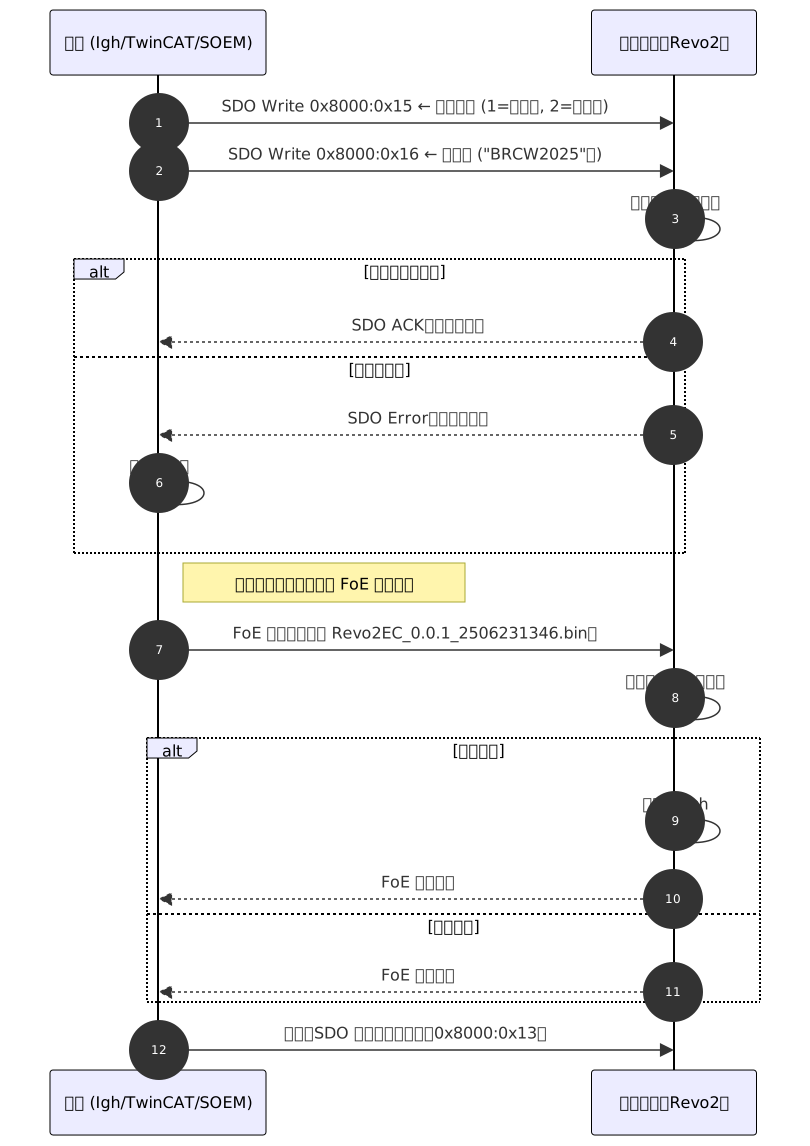
The complete FoE upgrade process includes four steps: authentication, defining the firmware type, transferring the firmware, and writing it to flash:
1. Master station writes the upgrade type and authentication code
- SDO 0x8000:0x15: Write upgrade type (1 = wrist board, 2 = control board)
- SDO 0x8000:0x16: Write authentication code (e.g., "BRCW2025")
2. Master station sends the firmware file via FoE
- The file name must exactly match the expected value (e.g., Revo2EC_0.0.1_2506231346.bin).
3. Slave station reception and verification
- Check if the authentication code matches.
- Write firmware to the corresponding Flash partition.
4. Upgrade Completed
- It is recommended that the master station resets the device or rescan the EtherCAT bus.
6.3 Precautions
- The file name is case-sensitive and must match exactly.
- PDO communication will be interrupted during the flash writing process.
- The device will automatically restart with the new firmware after the upgrade is completed.
- It is recommended to restart the EtherCAT bus after the upgrade finishes.
6.4 Upgrade timing diagram
6.5 Firmware file header structure
To ensure the legality and version identification of the firmware upgrade files.,All .bin files upgraded through FoE,The following header structure has been automatically added by the packaging tool.(A total of 16 bytes):
| Field Name | Length | Description |
|---|---|---|
| Magic Number | 8 bytes | Fixed identifier used to identify device type: wrist board → "BRCW2025" Control panel → "BRCC2025" |
| Firmware Version | 4 bytes | The structure of the firmware version number is as follows: The highest byte is a reserved field.(0x00), The last three bytes correspond to the major version number.(Major)、 Minor version number(Minor)、Revision number(Patch)。 For example, the version number 1.2.3 Represented as:0x00010203 |
| Reserved field | 4 bytes | Reserved field, currently 0x00, reserved for future expansion. |
This structure is automatically written to the file header by the packaging tool, and users do not need to add it manually, nor should they modify it.
** Upgrade Verification Logic**
- After the FoE file is received, first check if the Magic Number matches the current upgrade type;
- If it does not match, the upgrade is rejected; if it matches, proceed to the burning process.
- The firmware header data is used for upgrade determination and will not be written into the Flash application area.